
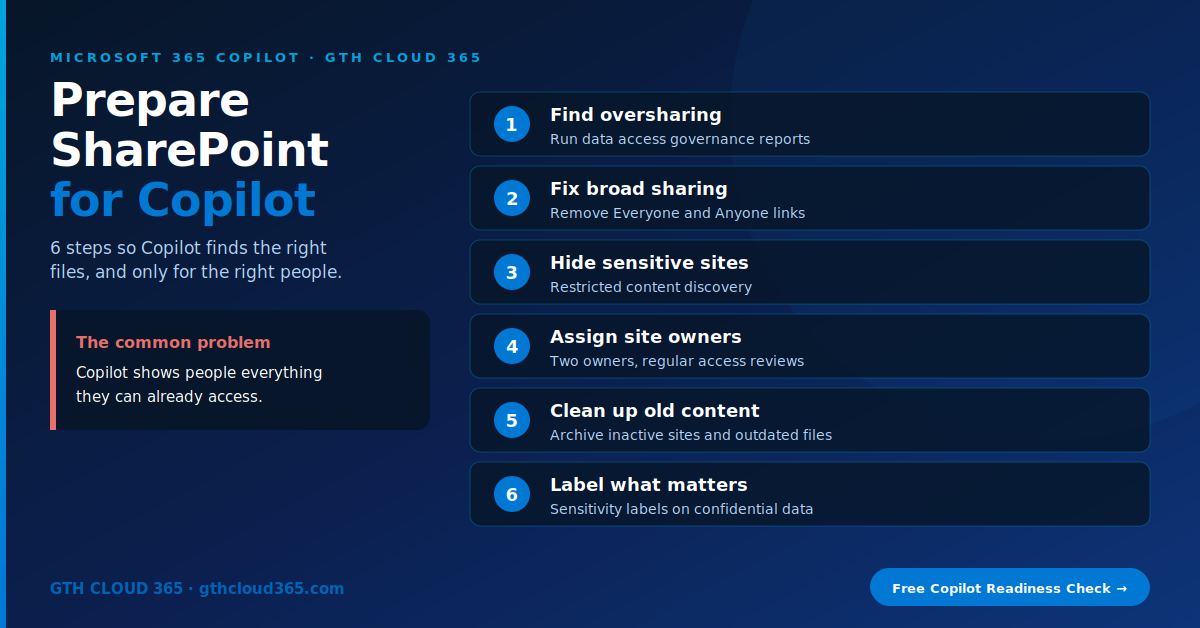
If you want to prepare SharePoint for Copilot, start with one simple fact: Microsoft 365 Copilot shows people everything they already have permission to see. It doesn’t create new access, but it makes existing access very easy to find.
Service: Copilot & AI Readiness | Best for: SMBs planning a Microsoft 365 Copilot rollout in the next 6–12 months
Before Copilot, an overshared folder was a hidden problem. Nobody stumbled on the salary spreadsheet in a site shared with “Everyone.” With Copilot, an employee only has to ask “What are the salary ranges for managers?” and the answer may come straight from that file.
That’s why the businesses that get the most from Copilot take time to prepare SharePoint for Copilot first. Here’s the 6-step checklist we use with clients.
Why You Need to Prepare SharePoint for Copilot
SharePoint and OneDrive hold most of your company’s documents, and Copilot searches them on every request. Three problems show up in almost every tenant:
- Oversharing. Sites and files shared with “Everyone except external users,” or “Anyone” links that never expire.
- Stale content. Old drafts, outdated policies and abandoned project sites that Copilot treats as current.
- No clear owners. Sites nobody manages, so nobody notices when the wrong people have access.
Fix those, and Copilot gives better answers and safer ones.
The 6-Step Checklist to Prepare SharePoint for Copilot
Step 1: Find oversharing with data access governance reports
In the SharePoint admin center, run the data access governance (DAG) reports. They show:
- Sites with the most sharing links, including “Anyone” links
- Sites shared with Everyone except external users (EEEU)
- Sites with a high number of users who have access
- Where sensitivity labels are or aren’t applied
Good news for Copilot customers: Microsoft includes SharePoint Advanced Management features with Microsoft 365 Copilot licenses. Once at least one Copilot license is assigned in your tenant, your SharePoint admin gets these reports and the tools in steps 3–5.
Step 2: Fix broad sharing
Start with the highest-risk sites from your reports:
- Remove “Everyone” and “Everyone except external users” permissions from sites that hold sensitive information.
- Replace them with Microsoft 365 groups or security groups for the people who actually need access.
- Remove old “Anyone” links and change the default sharing link to “Specific people” or “People in your organization” under SharePoint admin center → Policies → Sharing.
This is the single most important step when you prepare SharePoint for Copilot.
Step 3: Hide sensitive sites while you clean up
Cleanup takes time. In the meantime, use Restricted Content Discovery on sites like HR, Finance and Legal. It keeps those sites from showing up in organization-wide search and Copilot results for people who haven’t worked with them recently, without changing anyone’s permissions.
Treat it as a safety net while you fix permissions, not as a permanent replacement for them.
Step 4: Assign site owners and run access reviews
Every site should have at least two owners who know why it exists. With SharePoint Advanced Management you can:
- Use a site ownership policy to find sites with no owners or only one
- Send site access reviews to owners of overshared sites, so they confirm who should have access
Owners know their content better than IT does, and this spreads the work out.
Step 5: Clean up old and inactive content
Copilot can’t tell a 2019 draft from this year’s final version unless you help it.
- Turn on the inactive sites policy to find sites with no activity and ask owners to archive or delete them.
- Move old projects to an archive site with limited access.
- Keep one final version of key documents (policies, price lists, templates) in a clearly named library.
When you prepare SharePoint for Copilot, a smaller, cleaner library means more accurate answers.
Step 6: Label what matters
Apply sensitivity labels to confidential content, for example “Confidential” for contracts and “Highly Confidential” for HR and financial records. Labels can restrict access, add encryption and block guest sharing, and Copilot respects them. Microsoft 365 Business Premium includes manual sensitivity labeling. Automatic labeling needs higher licenses.
Prepare SharePoint for Copilot: Quick Reference
| Step | Tool | Where |
|---|---|---|
| Find oversharing | Data access governance reports | SharePoint admin center → Reports |
| Fix broad sharing | Site permissions and sharing settings | Site settings / Policies → Sharing |
| Hide sensitive sites | Restricted Content Discovery | SharePoint admin center → Sites |
| Assign owners | Site ownership policy, site access reviews | SharePoint admin center → Policies |
| Clean up old content | Inactive sites policy | SharePoint admin center → Policies |
| Label what matters | Sensitivity labels | Microsoft Purview portal |
Common Mistakes When You Prepare SharePoint for Copilot
- Waiting for perfect. You don’t need to fix every site. Start with HR, Finance, Legal and leadership sites.
- Blocking Copilot instead of fixing access. If a file is overshared, it’s overshared with or without Copilot.
- Ignoring Teams. Every Team has a SharePoint site behind it, so check those too.
- Forgetting guests. External users can be part of the oversharing problem. Our Microsoft 365 guest access governance plan covers that.
- Skipping Power BI. Reports and semantic models need the same care. See our guide to Power BI row level security.
Still deciding which Copilot to buy? Read Copilot vs Copilot Studio first. For the full governance picture, see our Microsoft 365 governance framework.
Microsoft’s own list of included features is in SharePoint Advanced Management features with a Copilot license on Microsoft Learn.
How GTH Cloud 365 Helps
Our Copilot and AI readiness service helps SMBs prepare SharePoint for Copilot in weeks, not months:
- Oversharing assessment using data access governance reports
- Permission cleanup on your highest-risk sites
- Restricted Content Discovery for sensitive sites during cleanup
- Site owner assignment and access review process
- Sensitivity labels and a simple content lifecycle plan
Better Copilot answers start with better SharePoint.
👉 Book a free Copilot readiness check. We’ll show you your top oversharing risks in 30 minutes.