
Azure DevOps Power Platform ALM is the combination that separates organizations using Power Platform professionally from those running ungoverned citizen development at scale — and for SMBs it is one of the most impactful governance investments available in the Microsoft ecosystem today.
Application Lifecycle Management for Power Platform means having a structured, repeatable, and controlled process for building, testing, and deploying Power Apps and Power Automate solutions across your organization. Azure DevOps is the Microsoft platform that makes that process possible — providing the pipelines, repositories, and release management capabilities that turn ad hoc citizen development into governed, audit-ready delivery.
Without Azure DevOps Power Platform ALM your organization is building production apps in a single environment with no version history, no testing stage, no rollback capability, and no way to know who changed what and when. When something breaks — and it will break — you are guessing.
This guide explains what Power Platform ALM actually means, why Azure DevOps is the right tool for SMBs implementing it, and exactly how to structure your environment strategy and pipeline configuration to deliver Power Platform solutions safely and repeatably.
What Is Power Platform ALM
Application Lifecycle Management in the context of Power Platform covers the full lifecycle of a Power Apps or Power Automate solution — from initial development through testing, deployment, and ongoing maintenance.
A mature Power Platform ALM framework answers these questions for every solution in your organization:
- Where is this solution built and tested before it goes live?
- How does it move from development to production and who approves that move?
- What happens if a deployed solution breaks and needs to be rolled back?
- Who owns this solution and who is responsible for maintaining it?
- What changed between the last version and the current one and why?
Without ALM none of these questions can be answered consistently. With Azure DevOps Power Platform ALM all of them are answered by the process itself — automatically, for every solution, every time.
Why Power Platform Without ALM Breaks SMBs
Before explaining how to implement Azure DevOps Power Platform ALM it is worth being specific about what happens to SMBs that skip it. This is not a theoretical risk — it is what GTH Cloud 365 finds in almost every Power Platform assessment we run.
We documented exactly this scenario in our Manufacturing case study — a quality inspection app broke on a Monday morning with no rollback and no documentation.
Production incidents from ungoverned changes
When there is no separate development environment every change to a Power App or flow goes directly live. A citizen developer testing a new approval step in a finance process accidentally breaks the routing logic. The finance team cannot process expense reports for two days. Nobody knows what changed or how to fix it because there is no version history and no rollback capability.
This is not an edge case. We have seen this scenario play out in manufacturing, professional services, healthcare, and financial services SMBs. It is the predictable consequence of building directly in production.
Orphaned solutions nobody understands
When Power Apps and flows are built by individual citizen developers with no documentation, no ownership assignment, and no ALM process the solutions become orphaned the moment their creator moves to a different role or leaves the organization. We regularly find business-critical processes running on Power Automate flows that nobody in the organization fully understands — flows that cannot be safely modified because there is no development environment to test changes in.
Audit and compliance failures
Regulated industries — healthcare, financial services, legal — face increasing scrutiny around the systems that process their data. A Power Platform solution handling patient intake, client onboarding, or financial transactions is a regulated system. Without ALM there is no audit trail of changes, no change management process, and no documentation of what the solution does or who approved it for production use.
Copilot amplification of ungoverned solutions
As organizations enable Microsoft Copilot the integration between Copilot and Power Platform becomes a governance concern. Copilot can trigger Power Automate flows and interact with Power Apps through natural language. An ungoverned flow with broad data access that a citizen developer built eighteen months ago becomes a Copilot-accessible process the moment AI is enabled. Without ALM you cannot inventory what processes exist, what data they access, or whether they are appropriate for AI interaction.
What Azure DevOps Brings to Power Platform ALM
Azure DevOps is Microsoft’s platform for planning, building, testing, and deploying software and solutions. For Power Platform specifically it provides four capabilities that are essential for ALM.
Source control with Azure Repos
Azure Repos provides Git-based source control for Power Platform solutions. When a solution is exported from the development environment and committed to a Git repository every change is tracked — who made it, when, and what specifically changed. This creates the version history that makes rollback possible and provides the audit trail that compliance requires.
CI/CD pipelines with Azure Pipelines
Azure Pipelines automates the movement of solutions between environments. When a developer commits a change to the repository a pipeline can automatically unpack the solution, run validation checks, and deploy it to the test environment. When testing is complete a release pipeline handles the promotion to production — with approvals, quality gates, and automated deployment replacing the manual export-import process that most SMBs use today.
Work item tracking with Azure Boards
Azure Boards connects Power Platform solution changes to the business requirements that drove them. Every deployment is linked to a work item — a user story, a bug, or a change request — providing the traceability that governance and compliance require. When an auditor asks why a specific change was made to a production solution the answer is in the Azure Boards work item linked to that deployment.
Environment management integration
Azure DevOps integrates with the Power Platform Admin Center to manage environment-specific connection references and environment variables — the configuration values that change between development, test, and production environments. Without this integration developers have to manually update connection references after every deployment, creating errors and slowing down the release process.
The Three-Environment Strategy
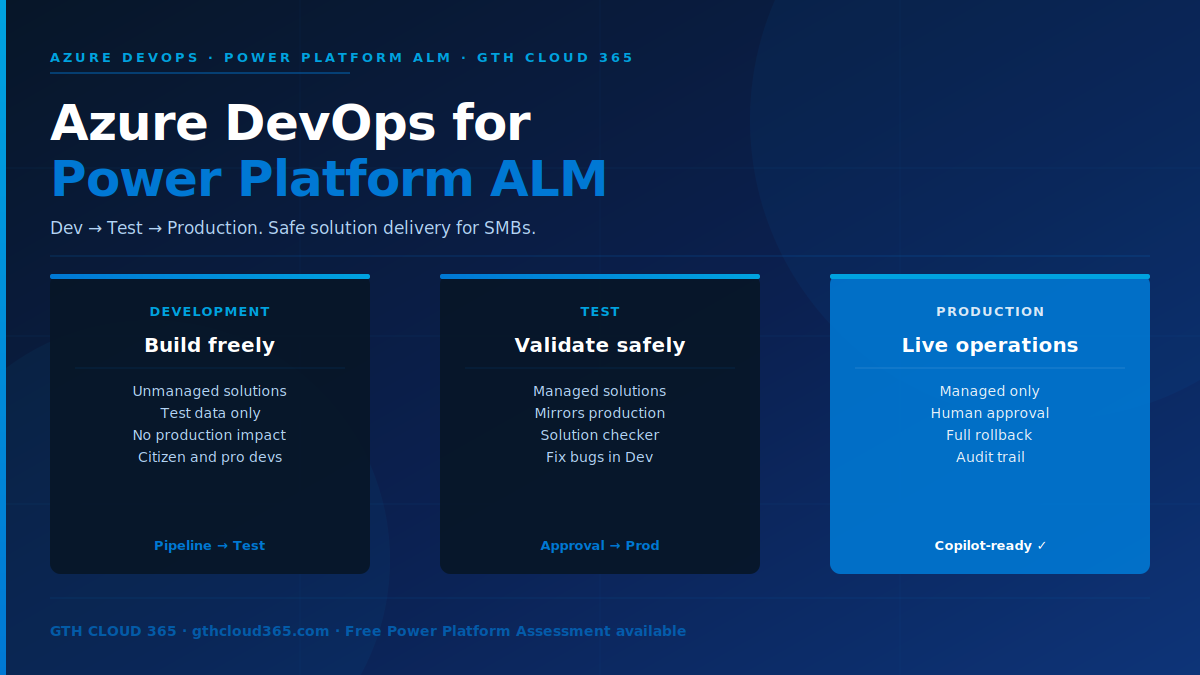
The foundation of Azure DevOps Power Platform ALM is a three-environment strategy. This is the minimum viable environment architecture for any organization using Power Platform for business-critical solutions.
Development environment
The development environment is where all building happens. Citizen developers and pro developers alike build their Power Apps and Power Automate flows here. It is a sandbox — mistakes here have no business impact because nothing in production depends on it. Solutions in the development environment are unmanaged — they can be freely modified, deleted, and rebuilt.
The development environment should have its own set of data connections pointing to development or test data sources — not production data. Developers should never need to connect to production data to build or test their solutions.
Test environment
The test environment is where quality assurance happens. When a developer believes their solution is ready for production they submit it through the ALM pipeline. The pipeline automatically deploys the solution to the test environment where it is validated against test scenarios before any human approves it for production.
The test environment should mirror production as closely as possible — same connections, same data volumes, same user groups. Solutions in the test environment are managed — they can be tested and validated but not directly modified. If a bug is found in testing it is fixed in development and redeployed through the pipeline.
Production environment
The production environment is where live business operations run. Solutions here are managed and can only be updated through the ALM pipeline — never by direct editing. Every change to a production solution goes through development, testing, and a formal approval step before it reaches production.
This structure eliminates the single most common cause of production incidents in ungoverned Power Platform environments — direct modification of production solutions by citizen developers.
Setting Up Azure DevOps Power Platform ALM — Step by Step
Step 1 — Create your three environments
In the Power Platform Admin Center go to Environments and create three environments — Development, Test, and Production. For each environment configure the environment type (Sandbox for Development and Test, Production for Production), the security group that has access, and the data loss prevention policies that apply.
If you already have a production environment with existing solutions this becomes your Production environment. Create new Development and Test environments alongside it.
Step 2 — Create your Azure DevOps organization and project
Go to dev.azure.com and create an Azure DevOps organization for your business. Create a project for Power Platform ALM. Within the project create a Git repository that will hold your Power Platform solution source files.
Step 3 — Install the Power Platform Build Tools
In Azure DevOps go to the Marketplace and install the Power Platform Build Tools extension. This extension provides the tasks that Azure Pipelines uses to interact with Power Platform — exporting solutions, unpacking them into source control, importing them into target environments, and running solution checkers.
Step 4 — Configure service connections
In Azure DevOps Project Settings create service connections for each of your three Power Platform environments. Each service connection uses an application user registered in Microsoft Entra ID with the System Administrator role in the corresponding Power Platform environment. These service connections are how Azure Pipelines authenticates to Power Platform without using individual user credentials.
Step 5 — Create your export pipeline
Create a build pipeline that exports the solution from the Development environment, unpacks it into its component files, and commits those files to your Git repository. This pipeline runs whenever a developer indicates their solution is ready for testing — typically triggered by a pull request or a manual pipeline run.
The key tasks in the export pipeline are Power Platform Export Solution, Power Platform Unpack Solution, and a Git commit step that saves the unpacked files to the repository.
Step 6 — Create your deployment pipelines
Create two release pipelines — one for deploying to the Test environment and one for deploying to Production.
The Test deployment pipeline packs the solution files from the repository, imports the managed solution into the Test environment, and runs the Power Platform Solution Checker to validate the solution against Microsoft best practices. This pipeline can run automatically when changes are committed to the main branch.
The Production deployment pipeline packs and imports to Production but includes a manual approval gate — a designated approver must review and approve the deployment before it proceeds. This approval step is the governance control that ensures no untested solution reaches production without human review.
Step 7 — Configure connection references and environment variables
For solutions that use connections to data sources create connection references in each environment pointing to the appropriate data source for that environment. Configure environment variables that hold environment-specific values — API endpoints, SharePoint site URLs, email addresses — so the same solution package works correctly in all three environments without manual modification after deployment.
Step 8 — Document and train
Create a simple ALM runbook covering the process for submitting a solution for testing, reviewing test results, requesting production approval, and handling a failed deployment. Train your citizen developers and IT staff on the process before going live. The technical pipeline is only as effective as the humans who use it correctly.
Azure DevOps Power Platform ALM for Copilot Readiness
One of the most important reasons for SMBs to implement Azure DevOps Power Platform ALM in 2026 is Copilot readiness.
Microsoft Copilot can interact with Power Platform solutions — triggering flows, querying apps, and surfacing results through natural language. Before enabling Copilot your organization needs to be able to answer questions that ALM makes answerable:
- What Power Platform solutions are running in production and what data do they access?
- Have all production solutions been reviewed and approved for Copilot interaction?
- Is there a change management process that ensures new solutions are reviewed before Copilot can interact with them?
Without Azure DevOps Power Platform ALM none of these questions can be answered with confidence. With it every production solution has a documented deployment history, an approved change record, and a known data access scope.
Key Takeaways
- Azure DevOps Power Platform ALM is the combination that separates governed professional delivery from ungoverned citizen development — and for SMBs it is achievable without an enterprise DevOps team
- The three-environment strategy — Development, Test, Production — is the foundation that eliminates production incidents from direct environment modification
- Azure DevOps provides four essential ALM capabilities — source control, CI/CD pipelines, work item tracking, and environment management integration
- Connection references and environment variables are the technical mechanism that makes the same solution package work correctly across all three environments
- The manual approval gate on the Production deployment pipeline is the governance control that ensures human review before every production change
- Azure DevOps Power Platform ALM is a prerequisite for safe Copilot adoption — it gives you the inventory and change control that AI governance requires
- Implementation takes three to five weeks for most SMBs — the investment pays back immediately in reduced production incidents and faster, more confident solution delivery
- If you have not yet built your Microsoft 365 governance framework that is the right starting point before implementing ALM.
Is Your Power Platform Environment ALM-Ready
Most SMBs using Power Platform are not — and the gap between where they are and where they need to be for safe Copilot adoption is wider than they realize.
GTH Cloud 365 offers a free Power Platform Governance Assessment for SMB and mid-market organizations. In one session we identify your current ALM gaps, environment strategy issues, and the specific steps needed to implement Azure DevOps Power Platform ALM in your organization.
No obligation. No sales pressure. Just specific, actionable guidance for your Power Platform environment.
Request Your Free Power Platform Assessment →