
SharePoint governance financial services organizations need goes far beyond basic IT management — client data confidentiality, regulatory requirements, and Copilot readiness all depend on getting it right.
The Client
A growing financial advisory and wealth management firm with 85 employees providing investment advisory, financial planning, and business financial consulting services to high-net-worth individuals and mid-market businesses across the United States. The firm had been using Microsoft 365 for four years and relied heavily on SharePoint Online for client document management, financial analysis storage, and internal collaboration.
Service: SharePoint Intranet Governance and Microsoft 365 Security
Industry: Financial Services
Company Size: 85 employees — SMB
Location: United States
Technologies: Microsoft 365, SharePoint Online, Microsoft Teams, OneDrive for Business, Microsoft Purview
The Business Challenge
Four years of growth had left the firm’s SharePoint environment functional on the surface but deeply ungoverned underneath.
Financial advisory firms operate under strict obligations around client data confidentiality. Client investment portfolios, financial analysis documents, audit workpapers, and personal financial planning records represent some of the most sensitive data any organization handles. The regulatory and reputational consequences of exposing this data — even accidentally — are severe.
The trigger for the engagement was a compliance review.
The firm’s compliance officer was preparing for an annual internal audit when they asked their IT coordinator a straightforward question: “Can you show me who currently has access to our client investment files?”
The IT coordinator could not answer with confidence.
Four years of ad hoc SharePoint site creation, manual permission grants, staff turnover, and never-reviewed sharing settings had created an access landscape that nobody fully understood. The compliance officer followed up with three more questions that the IT coordinator also could not answer confidently:
“Do former advisors still have access to their clients’ files?”
“Can junior analysts see senior client portfolio analysis they are not assigned to?”
“Are we in a position to safely enable Microsoft Copilot?”
All four questions pointed to the same underlying problem. SharePoint had never been governed. And in a financial services environment that was not just an IT problem — it was a compliance risk.
Why They Chose GTH Cloud 365
The firm had previously worked with a generalist managed services provider for day-to-day Microsoft 365 support. That provider kept the environment running but did not have the specialized governance expertise to address SharePoint permissions, sensitivity labels, or Copilot readiness.
The compliance officer found GTH Cloud 365 through our SharePoint permission sprawl blog post. The description of what ungoverned SharePoint looks like in practice — stale permissions, broken inheritance, unreviewed external sharing — matched their situation exactly.
In our first conversation we were able to describe their likely permission landscape in detail before seeing their environment — because we had assessed dozens of similar financial services SMBs. That immediately established the trust needed to proceed.
We proposed a three-week focused engagement with fixed scope, fixed timeline, and clear deliverables aligned to their compliance audit timeline.
What GTH Cloud 365 Found
We conducted a full SharePoint governance assessment at the start of Week 1. In a financial services environment the stakes of what we find are higher than most — and the findings were significant.
Sites and structure:
- 34 SharePoint sites across the tenant — 22 active, 12 inactive or abandoned
- Client engagement sites mixed with internal operational content — no structural separation between client-facing and internal-only content
- No site ownership documentation — most sites had default system accounts as primary owners
- No information architecture aligned to the firm’s client service model or regulatory obligations
Permissions and access:
- 3 former advisors retained direct SharePoint permissions on client engagement sites despite their accounts being disabled — their client files, portfolio analysis, and financial planning documents remained accessible
- Junior analysts had access to senior client portfolio analysis sites they had no advisory relationship with
- 6 external sharing links were active pointing to client-related financial documents — 4 had no expiration date and it was unclear whether the external recipients still needed access
- Broken permission inheritance on 8 folders within supposedly secured client libraries — content was accessible to broader groups than the site itself
Content and classification:
- Zero sensitivity labels applied anywhere in the tenant
- Client investment portfolios, personal financial planning records, audit workpapers, and general internal content were all stored and shared identically with no classification
- No DLP policies existed — a staff member could email a client’s portfolio analysis to any external address with no warning and no audit record
Regulatory exposure:
- The firm’s obligation to protect client financial information under applicable regulations was not supported by any technical controls in their Microsoft 365 environment
- If audited on their data access controls the firm could not demonstrate who had access to client data, when that access was granted, or how it was governed
- Copilot enablement in this state would have allowed any staff member to query client portfolio data across the entire firm through natural language — regardless of whether they had an advisory relationship with that client
What We Did
Our SharePoint governance financial services engagement began with a full tenant assessment delivered within the first three days.
Week 1 — Full assessment, risk prioritization, and immediate remediation
We completed the governance assessment and delivered a prioritized risk report by end of day three. The report identified two categories of action — immediate remediation that could be completed within 48 hours with zero user impact, and structural remediation requiring planned change management in Week 2.
Within 48 hours of the assessment delivery we removed all 3 former advisor permission sets across every client engagement site they had retained access to. We reviewed all 6 external sharing links — 4 were revoked immediately as the business relationship had ended, 2 were confirmed as still needed and reconfigured with 30-day expiration dates and named external recipients.
We also disabled anonymous sharing at the tenant level — preventing any future links without explicit user authentication from being created.
We decommissioned the 12 inactive and abandoned sites after confirming with the compliance officer and practice leads that none contained content still needed by the business. This reduced the governance surface and eliminated a category of risk that would have been difficult to monitor ongoing.
Week 2 — Permission restructuring, sensitivity labels, and DLP
We redesigned the SharePoint site structure around the firm’s three primary content categories — Client Engagements, Internal Operations, and Compliance and Finance. Each received a governed site template with consistent permissions aligned to advisory roles rather than individual users.
For Client Engagement sites we implemented a strict role-based permission model — Lead Advisors had full control of their client sites, Supporting Advisors had contribute access only on engagements where they had an active supporting role, and all other staff access was removed. No junior analyst could access a client engagement site unless they were explicitly assigned to that engagement by a Lead Advisor.
We implemented the sensitivity label framework in Microsoft Purview — five labels for this engagement covering Public, Internal, Confidential, Highly Confidential, and a dedicated Client Financial Data label for content subject to the firm’s highest level of data protection obligations. We applied the Client Financial Data label as the default for all Client Engagement document libraries.
We implemented three DLP policies — one blocking external sharing of content labeled Client Financial Data or Highly Confidential without explicit compliance officer approval, one warning advisors before emailing content classified as Confidential to external recipients with a required business justification, and one generating an audit alert when Client Financial Data labeled content was accessed outside of normal business hours.
Week 3 — Validation, Copilot readiness, and compliance documentation
We ran a full validation pass across all 22 active sites confirming permissions, sensitivity labels, DLP policies, and audit logging were all functioning correctly. We confirmed that no residual high-risk access remained from the Week 1 findings.
We validated Copilot readiness — all governance prerequisites were met. We recommended a Copilot pilot for the four most senior advisors and the compliance officer as an initial group before broader rollout.
We configured Microsoft Entra ID Access Reviews for all Client Engagement site memberships — quarterly reviews requiring Lead Advisors to confirm that current site members still had an active engagement relationship. This prevents the four-year accumulation from repeating.
We delivered a SharePoint Governance and Compliance Playbook covering the site structure, permission model, sensitivity label framework, DLP policy reference, external sharing rules, audit alert procedures, and the quarterly access review process. The playbook was specifically written to support the firm’s internal compliance audit process — every control documented with evidence that could be presented to auditors.
We ran a one-hour compliance awareness session with all advisory staff covering their data handling responsibilities under the new framework — particularly around the Client Financial Data label and the new rules for sharing client content externally.
The Results
Three weeks after beginning this SharePoint governance financial services engagement the firm had a fundamentally different access posture.
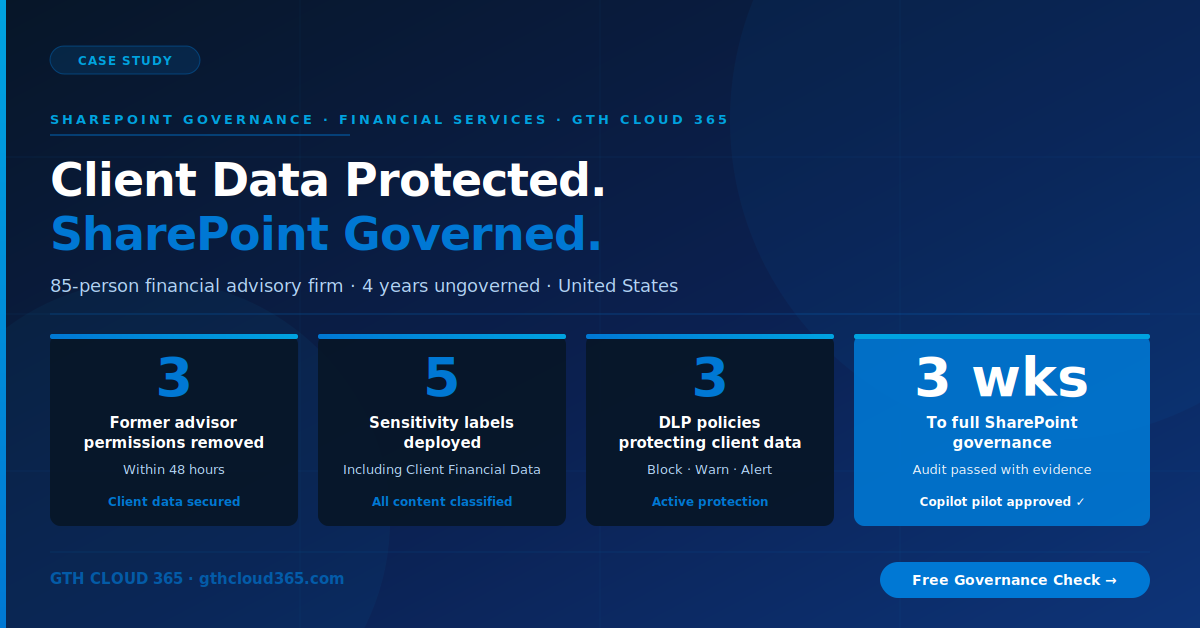
- 3 former advisor permission sets fully removed — client data no longer accessible to departed staff
- 6 external sharing links reviewed — 4 revoked, 2 reconfigured with expiration and named recipients
- 12 inactive sites decommissioned — governance surface reduced significantly
- Role-based permissions implemented — client content accessible only to advisors with active engagement relationships
- 5 sensitivity labels deployed — including a dedicated Client Financial Data label applied by default to all client document libraries
- 3 DLP policies active — blocking, warning, and alerting on client data sharing scenarios
- Audit logging configured for after-hours access to Client Financial Data labeled content
- Copilot pilot approved for 5 senior users — first phase of AI adoption enabled safely
- Quarterly access reviews configured in Microsoft Entra ID
- SharePoint Governance and Compliance Playbook delivered and accepted by the compliance officer as audit evidence
Two weeks after the engagement closed the firm’s compliance officer used the governance playbook and permission audit documentation as evidence in their annual internal audit. The auditor accepted the documentation without requesting additional evidence — the first time in three years the firm had been able to demonstrate technical controls around client data access with documented evidence.
What the Client Said
“Our compliance officer had been asking for documented evidence of client data access controls for three years. We never had it. Three weeks after engaging GTH Cloud 365 we had a full permission model, sensitivity labels on every client document library, DLP policies blocking unauthorized sharing, and a compliance playbook that our auditor accepted without question. This engagement paid for itself in the first audit.”
— Managing Partner, Financial Advisory Firm, United States
Does Your Financial Services SharePoint Environment Have These Controls
Most financial services SMBs using Microsoft 365 cannot demonstrate documented evidence of client data access controls. They have the intent to protect client data — but not the technical controls to prove it.
Permission sprawl, stale advisor access, and unclassified client financial content are not unusual in a growing financial services firm. They are the predictable result of four years of growth without governance.
The question is whether you know about these gaps before your next audit, before a client asks for a data security attestation, or before Copilot surfaces a client’s portfolio analysis to a staff member who was never supposed to see it.
GTH Cloud 365 offers a free Microsoft 365 Governance and AI Readiness Health Check for financial services SMBs. In one session we identify your highest-risk permission issues, classification gaps, and a clear remediation roadmap.
No obligation. No sales pressure. Just specific, actionable guidance for your SharePoint environment.
SharePoint governance financial services organizations need does not require months of planning — a focused three-week engagement delivers the foundation your firm needs.
Request Your Free Governance Health Check →